Tutorials

2 0 Beginner
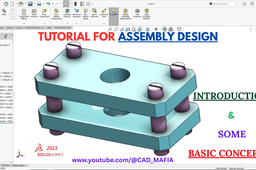
Welcome to CAD_MAFIA – your ultimate hub for mastering CAD tools! In this tutorial, we’re kicking off our SolidWorks Assembly series with a beginner-friendly Introduction to Assembly. 🔧 What You’ll Learn in This Video: What is an Assembly in SolidWorks? Understanding Parts vs. Assemblies How to insert and mate components Basic tips to avoid common beginner mistakes Whether you're a student, an engineer, or just starting out in 3D modeling, this tutorial is designed to give you a solid foundation in SolidWorks Assembly. Follow along and start building real-world mechanical projects today! 💡 Don’t forget to: 👍 Like 📩 Subscribe 🔔 Turn on notifications for more CAD tutorials every week! #SolidWorks #CADMafia #SolidWorksAssembly #3DCAD #EngineeringDesign #tutorial Channel Link: http://www.youtube.com/@UCAzC_GQZxGrXgkc6kdXWu2Q Video Link: https://youtu.be/ORTiHZoeLjk Like Facebook Page: Like Facebook Page: https://www.facebook.com/profile.php?viewas=100000686899395&id=61571270848113

1 1 Beginner
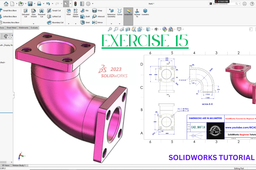
Welcome to CAD MAFIA, your go-to channel for SolidWorks Mechanical design tutorials! In this SolidWorks Tutorial for Beginners - Exercise 15, we’ll teach you how to create a Basic Flange Pipe model in SolidWorks 2023 using essential feature tools. What We’ll Learn in This Tutorial: ✅ Extruded Boss – Create solid 3D shapes ✅ Extruded Cut – Remove material with precision ✅ Fillet – Add smooth rounded edges ✅ Mirror – Achieve symmetry effortlessly ✅ Hole Wizard – Easily create standard holes ✅Chamfer- Add Smooth Angular Edges ✅Swept Boss-Create Shape with Profile & Path This step-by-step guide is perfect for beginners looking to improve their 3D modeling skills in SolidWorks 2023. 🔥 Don’t forget to SUBSCRIBE to CAD MAFIA and hit the 🔔 bell icon to stay updated with more beginner-friendly tutorials! 📌 Watch now and start designing with confidence! 🚀